One long-running concern with serverless is that elastic scale can turn a traffic spike into a bill spike—great for availability, but it can create cost surprises.
Our view is that the long-term fix is to make serverless progressively cheaper through better resource efficiency—and to keep passing along savings as CPUs and runtimes get faster and can do more work per dollar. Until that improvement fully eliminates surprise spend, predictable guardrails matter.
Agiler already supports prepaid credits so you are never auto-charged by default. That keeps spending predictable for most teams. But if you enable auto-reload to keep your website online, you need an additional way to control spend.
That’s why today we are introducing Billing Budgets—budget controls that help you cap spend while still benefiting from serverless elasticity.
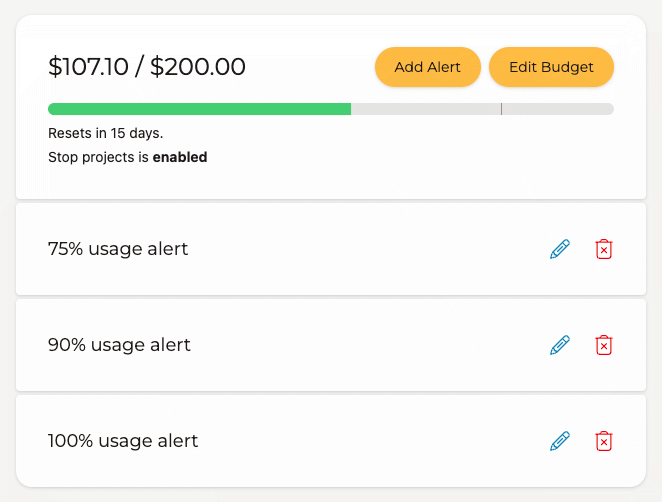
What you can do with budgets
- Set a billing budget that matches your comfort level
- Create alerts at percentage thresholds (for example 50%, 80%, and 100%)
- Automatically stop projects when the budget is exceeded
Why this matters
Budgets let you keep availability and cost control at the same time:
- Prepaid credits prevent surprise auto-charges
- Alerts give your team early visibility before limits are hit
- Auto-stop provides a hard guardrail when spending crosses your limit
If you use auto-reload, budgets are the safety system that helps keep your site online without letting costs run away.
Related articles
© 2026 Agiler. All rights reserved.
The WordPress® trademark is the intellectual property of the WordPress Foundation, and the Woo® and WooCommerce® trademarks are the intellectual property of WooCommerce, Inc. Uses of the WordPress®, Woo®, and WooCommerce® names in this website are for identification purposes only and do not imply an endorsement by WordPress Foundation or WooCommerce, Inc. Agiler is not endorsed or owned by, or affiliated with, the WordPress Foundation or WooCommerce, Inc.